
Sviluppa con Codex e Claude come un unico team
Direzione tecnica, sviluppo, qualità e sicurezza: ruoli chiari, prove condivise e tutti i prompt pronti da copiare in inglese.
Inizia qui: a cosa serve la guida
Se lo stesso assistente progetta, scrive e approva, può perdere domande importanti. Definisci architettura, sviluppo, QA e sicurezza con risultati e prove. L’obiettivo è un progetto verificabile con criteri chiari, non soltanto altre conversazioni.
Un esempio concreto
La risposta illustra il formato atteso, non un audit della tua applicazione. Segui i passaggi e confronta file, test e risultati reali. Se l’assistente dice soltanto di aver finito, chiedi il risultato concreto, le prove e cosa resta da verificare.
CTO: acceptance criteria and constraints.
Coder: focused diff and implementation notes.
QA/security: independent findings with evidence.
Owner: final decision after unresolved issues are visible.
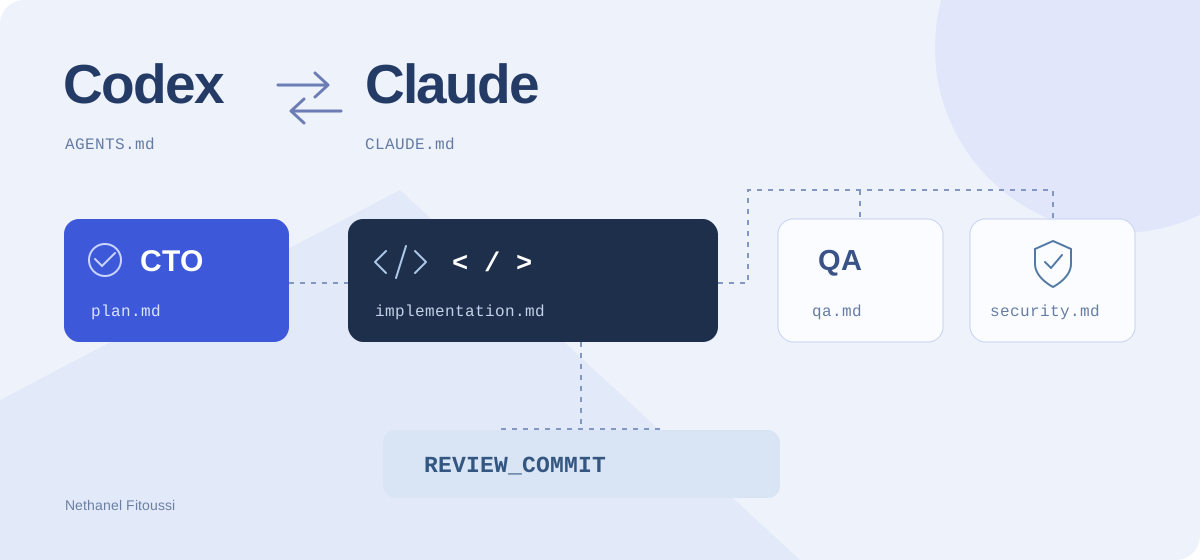
Due assistenti di programmazione sono più utili quando hanno responsabilità diverse e un modo chiaro per passarsi il lavoro. Questo metodo prevede una direzione tecnica, uno sviluppatore, una verifica della qualità e una revisione della sicurezza.
Tutti i prompt da copiare restano in inglese in ogni versione. Il campo OUTPUT_LANGUAGE nel documento iniziale determina la lingua dei rapporti.
1. Assegna un compito a ogni sessione
- Direzione tecnica → Claude: chiarire il bisogno, proporre un piano circoscritto e definire i criteri di riuscita.
- Sviluppo → Codex: implementare la modifica concordata e documentare le verifiche effettuate.
- Qualità → una nuova sessione Claude: verificare in modo indipendente il comportamento e le regressioni.
- Sicurezza → una nuova sessione Codex: esaminare la modifica e segnalare rischi difensivi supportati da prove.
Questa assegnazione è un esempio, non una graduatoria delle capacità degli strumenti. Puoi scambiarli. Tieni la revisione separata dalla conversazione di implementazione e fornisci al revisore le informazioni necessarie.
Inizia con quattro sessioni riconoscibili. Il metodo di base utilizza il passaggio esplicito dei file, senza integrazioni API o deleghe automatiche.
2. Prepara un obiettivo e regole condivise
Utilizza questa struttura. I nomi dei rapporti sono una nostra convenzione; gli strumenti non li riconoscono automaticamente come file speciali.
my-project/
├── AGENTS.md
├── CLAUDE.md
└── docs/ai/team/
    ├── project-brief.md
    ├── contract.md
    ├── plan.md
    ├── implementation.md
    ├── qa.md
    ├── security.md
    ├── release.md
    └── handoff.md
Specifica una funzionalità concreta, i comandi reali e criteri osservabili. Sostituisci i valori tra parentesi quadre. Compila la revisione da esaminare quando il candidato è pronto.
# Project brief
PROJECT: [product, users and actual stack]
FEATURE: [one small, concrete change]
OUTPUT_LANGUAGE: [English, French, Hebrew, Spanish, Italian or Arabic]
BASE_COMMIT: [starting Git commit]
REVIEW_COMMIT: [candidate commit; fill after implementation]
VERIFIED_COMMANDS: [actual setup, test and build commands]
ACCEPTANCE_CRITERIA:
- [observable successful behavior]
- [important failure or permission case]
OUT_OF_SCOPE: [what must stay outside this task]
Example feature: add a category filter that works with project search.
Ogni ruolo riceve le stesse regole. Solo lo sviluppatore modifica il codice applicativo; ogni revisore è responsabile del proprio rapporto.
# Shared team contract
Report filenames below are relative to docs/ai/team/.
Read project-brief.md and the report relevant to your role.
Reports use OUTPUT_LANGUAGE. Keep code, commands and paths unchanged.
The owner decides scope and authorizes release.
Roles: CTO plans; developer implements; QA verifies behavior;
security reviewer checks concrete defensive risks.
Only the assigned developer edits application code.
Each reviewer may write only its assigned report.
QA and security inspect the same frozen REVIEW_COMMIT.
Record the actual inspected commit in every review report.
If the candidate changes, identify and rerun affected checks.
Use local or approved test environments and synthetic data.
Never put credentials or personal data in shared files.
Never claim a check ran when it did not: write NOT RUN.
Do not commit, push, deploy or change infrastructure unless requested.
Do not silently broaden scope or overwrite another role's report.
Prompt instructions do not replace tool permissions or isolation.
Codex utilizza AGENTS.md per le istruzioni del repository; Claude Code utilizza CLAUDE.md. Integra questi brevi rimandi nelle istruzioni esistenti. Le regole di caricamento sono diverse: chiedi esplicitamente a entrambe le sessioni di leggere i file condivisi.
# Team workflow
Before starting, read docs/ai/team/contract.md
and docs/ai/team/project-brief.md.
Follow the role assigned in the current task message.
Use the existing repository conventions and verified commands.
Report missing context instead of inventing it.# Team workflow
Before starting, read docs/ai/team/contract.md
and docs/ai/team/project-brief.md.
Follow the role assigned in the current task message.
Use the existing repository conventions and verified commands.
Report missing context instead of inventing it.3. Parti dalla direzione tecnica
Incolla questo prompt nella sessione Claude dedicata alla pianificazione. Esamina ambito e criteri prima di passare il piano allo sviluppatore. Un piano è una proposta, non una prova che il risultato funzioni.
Act as the CTO for this task. Do not implement application code.
Read the applicable repository instructions, docs/ai/team/contract.md,
project-brief.md and the relevant code.
Confirm the user goal, constraints and current architecture.
Ask a focused question if an unknown changes the solution.
Write docs/ai/team/plan.md with:
1. Scope and explicit non-goals.
2. Observable acceptance criteria, including failure cases.
3. A short implementation plan and likely files affected.
4. QA scenarios and security concerns to investigate.
5. Verification commands confirmed from this repository.
6. Risks, open questions and the next handoff.
Do not invent commands or expand the feature.
Write in OUTPUT_LANGUAGE and present the plan for owner review.
4. Affida a Codex un’implementazione circoscritta
Dopo l’approvazione del piano, passalo alla sessione di sviluppo. Mantieni un solo responsabile delle modifiche al codice di questa attività. Successivamente i revisori potranno lavorare in parallelo sul candidato congelato.
Act as the implementation developer.
Read the repository instructions and docs/ai/team/contract.md,
project-brief.md and the owner-approved plan.md.
Implement only the agreed feature, following existing conventions.
Keep the diff focused. Add meaningful tests where the behavior warrants it.
Run the relevant verified checks and inspect the resulting diff.
Write docs/ai/team/implementation.md with:
- Changes and files affected.
- Acceptance criteria addressed.
- Exact commands run and observed results.
- Remaining issues and checks marked NOT RUN.
- How QA and security can reproduce and inspect the change.
Do not claim the work has passed independent review.
Do not edit qa.md or security.md.
Do not commit, push or deploy unless the owner requests it.
Stop for the owner to freeze a candidate REVIEW_COMMIT.
Write your report in OUTPUT_LANGUAGE.
5. Congela una revisione e fai due controlli
Prepara un commit candidato secondo il processo del repository e registra il suo SHA completo in REVIEW_COMMIT. Verificalo in ogni ambiente di revisione:
git rev-parse HEADNon presumere che un’altra sessione veda modifiche non salvate in un commit. Worktree separati possono isolare il lavoro, ma i revisori hanno bisogno dello stesso codice, di un ambiente di test adeguato e di dati fittizi. Escludi le credenziali di produzione.
Qualità e sicurezza possono ora esaminare lo stesso candidato in parallelo. Ogni sessione scrive il proprio rapporto senza modificare l’applicazione o cambiare la revisione esaminata.
Act as an independent QA reviewer of REVIEW_COMMIT.
Read docs/ai/team/contract.md, project-brief.md, plan.md
and implementation.md. Confirm your checkout matches REVIEW_COMMIT.
If the revision or required context is missing, stop and report it.
Do not modify application code, dependencies or Git state.
Use the approved local test environment and synthetic fixtures.
Check the acceptance criteria, happy path, failures and regressions.
For UI changes, check phone and desktop behavior and keyboard access.
Run the relevant tests when available; distinguish manual checks.
Write only docs/ai/team/qa.md, in OUTPUT_LANGUAGE:
- Inspected commit and environment.
- Each scenario: PASS, FAIL or NOT RUN, with observed evidence.
- Bugs with reproducible steps, expected and actual behavior.
- Unchecked areas and a readiness recommendation.
A developer's summary is a starting point, not proof.Act as an independent defensive security reviewer of REVIEW_COMMIT.
Read docs/ai/team/contract.md, project-brief.md, plan.md
and implementation.md. Confirm the exact inspected commit.
Do not modify application code, dependencies or Git state.
Review the changed code, trust boundaries and affected data flows.
Investigate relevant authentication, authorization, cross-tenant access,
input validation, injection, XSS, uploads, secrets and sensitive logging.
Use only approved local/test environments and harmless synthetic data.
Do not test third-party or production targets without authorization.
Write only docs/ai/team/security.md, in OUTPUT_LANGUAGE.
For each supported finding include severity, file and line, evidence,
preconditions, impact, a safe reproduction and a proposed mitigation.
Separate confirmed findings from hypotheses and checks NOT RUN.
State the review scope and limitations. Do not claim a full security audit.
Return a readiness recommendation for the owner.6. Riporta i problemi allo sviluppatore
La sessione di implementazione affronta i problemi confermati. Se cambia il codice, i vecchi rapporti si riferiscono alla revisione precedente: congela un nuovo candidato e ripeti i controlli interessati.
Read docs/ai/team/qa.md and security.md against the reviewed commit.
For each finding, reproduce it or explain with evidence why it
does not apply. Do not dismiss a report without checking it.
Fix confirmed issues within the agreed scope and add regression
coverage where appropriate. Do not rewrite reviewers' reports.
Update implementation.md with finding IDs, changes and actual checks.
List unresolved issues clearly.
Ask the owner to freeze a new REVIEW_COMMIT.
Request QA and security to recheck affected behavior on that revision.
Write in OUTPUT_LANGUAGE. Do not push or deploy.
7. Chiedi una raccomandazione per il rilascio
La direzione tecnica riunisce le prove. Un test superato, un rapporto qualità e una revisione di sicurezza forniscono evidenze diverse. I controlli non eseguiti devono rimanere visibili.
Act as CTO for the release decision review.
Read project-brief.md, plan.md, implementation.md, qa.md and security.md.
Confirm the reports apply to the same current REVIEW_COMMIT.
Check acceptance criteria, open findings and checks NOT RUN.
Write docs/ai/team/release.md in OUTPUT_LANGUAGE:
- Candidate commit and feature summary.
- Evidence-backed results and remaining limitations.
- Blocking issues and unresolved risk decisions.
- Proposed rollout checks and rollback approach.
- Recommendation: READY FOR OWNER REVIEW or BLOCKED.
Do not invent approval, close findings without evidence, merge,
push or deploy. The project owner authorizes the actual release.
La persona responsabile del progetto decide se integrare o distribuire la modifica. Un rapporto che dice «pronto» non autorizza il rilascio.
8. Facilita la sessione successiva
Termina con una breve nota di passaggio. Quando continui in un altro strumento, fornisci esplicitamente i file o l’accesso all’ambiente corretto. Un file creato in un ambiente non compare automaticamente in un altro.
Update docs/ai/team/handoff.md in OUTPUT_LANGUAGE.
Record the active goal, current candidate commit, completed work,
checks actually run, open QA/security findings, and the next action.
Link the relevant reports. Do not copy full conversations or secrets.
Keep planned, implemented and verified work clearly separate.
End with a short restart message that names the role and files to read.
Do not imply that another tool has received a message automatically.
Quando il metodo manuale è affidabile, un collegamento personalizzato tramite CLI o SDK può trasferire i file e seguire le revisioni. È un’integrazione distinta: mantieni i limiti dei ruoli, i permessi e le verifiche delle evidenze.
9. Scarica e prova una piccola funzionalità
Scarica tutti i prompt in inglese e i file iniziali. Estrai in una cartella temporanea, controlla i contenuti e integrali con i file esistenti. Il kit comprende il documento iniziale, le regole comuni, i rimandi alle istruzioni e i sette file di prompt per ruoli e passaggi.
Prova un filtro per categoria o una piccola modifica a un modulo. L’ordine è: obiettivo del proprietario → piano tecnico → sviluppo → revisione congelata → qualità e sicurezza → correzioni e nuove verifiche → decisione umana sul rilascio.
Riferimenti ufficiali
Verificati il 24 ottobre 2026. L’assegnazione dei ruoli, i prompt e la struttura docs/ai/team/ sono nostre proposte; queste fonti descrivono gli strumenti.
- OpenAI: istruzioni del repository con AGENTS.md
- OpenAI: worktree e ambienti isolati
- OpenAI: esempi di processi di sviluppo
- Anthropic: istruzioni e memoria di Claude Code
- Anthropic: contesto e permessi dei sottoagenti
Portalo nel tuo progetto
Scarica i file, conserva la guida o consegna al tuo assistente istruzioni pronte.
Prepara con l’IA
Copia questo prompt inglese nel tuo assistente. Include articolo, file disponibili e passaggi di preparazione.
Mostra il prompt di preparazione
Read this tutorial as reference material:
https://nethanelfitoussi.com/article/codex-claude-project-team?lang=en

Goal: apply the documented workflow to my development project.
Read the existing project instructions, inspect the relevant files and explain the smallest useful setup.

Available starter files:
https://nethanelfitoussi.com/tutorials/codex-claude-team-starter.zip
Download and inspect these files in a temporary folder before using them. Do not overwrite existing project instructions.

If I have not supplied a project folder, ask which development project to use. Do not invent a repository URL.

Adapt example paths, commands and acceptance criteria to this repository rather than assuming they match.

Give me a short plan, then make the agreed local changes and run the relevant checks. Report actual results and anything not verified. Stop before credentials, paid services, production changes, push, merge or deployment.Continua a esplorare

LLM, RAG o agente IA? Differenze e caso pratico completo
Una guida approfondita a ciò che sa un modello, alle prove offerte dal recupero e agli strumenti di un agente. La stessa richiesta passa dal consiglio generico a una bozza controllata, con diagrammi, esempi, prompt inglesi e progetto eseguibile.

Creare un RAG che legge PDF con n8n: copilota espositori, passo per passo con schermate
Un assistente che combina programma, guida espositori e informazioni della sede per preparare l’arrivo. Tutorial completo con vere schermate n8n, PDF di esempio, workflow importabili, IA locale e verifica delle fonti.

Valutare dipendenze vulnerabili con IA senza forzare tutti gli aggiornamenti
Leggi npm audit, separa gravità e raggiungibilità e verifica un aggiornamento compatibile. Rapporto fittizio e cinque test inclusi.