
Build with Codex and Claude as one project team
A CTO, a developer, QA and a security reviewer—with clear handoffs, shared evidence, and every English prompt ready to copy.
Start here: why this guide is useful
When the same assistant designs, codes and approves its own change, important questions can be missed. Give architecture, implementation, QA and security distinct responsibilities. This guide defines deliverables and handoffs so each role has evidence to inspect. The goal is a reviewable project with clear acceptance criteria, not merely more AI conversations.
A concrete example
The following is an illustrative response format, not the result of an audit of your application. Use it to recognise what a useful answer should contain. Follow the detailed steps below, then compare the actual files, tests or output with this target. If the assistant only says “done”, ask for the changed artifact, the evidence and what remains unverified.
CTO: acceptance criteria and constraints.
Coder: focused diff and implementation notes.
QA/security: independent findings with evidence.
Owner: final decision after unresolved issues are visible.
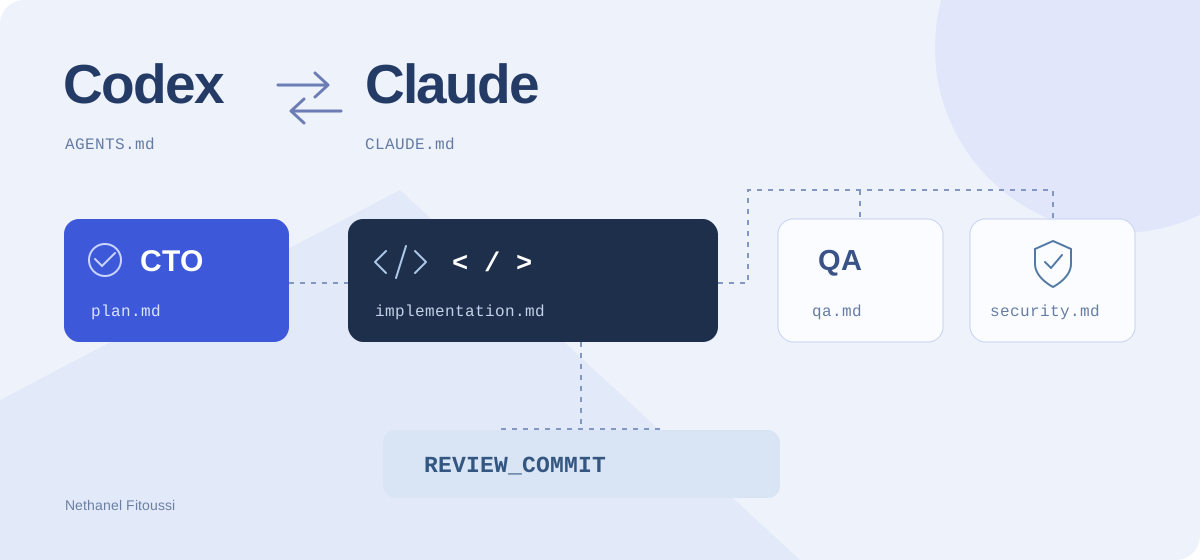
Two coding assistants are more useful when they have different responsibilities and a clear way to exchange work. Here is a repeatable workflow with a CTO, one developer, QA and a security reviewer.
All copyable prompts below stay in English in every language version. Set OUTPUT_LANGUAGE in the brief to choose the language of the agents’ reports.
1. Give each session one job
- CTO → Claude: clarify the need, design a small plan and define what counts as done.
- Developer → Codex: implement the agreed change and document actual checks.
- QA → a fresh Claude session: independently verify behavior and regressions.
- Security → a fresh Codex session: inspect the change for supported defensive security findings.
This allocation is an example, not a claim that a tool is inherently better at one role. You can swap them. Keep the reviewer separate from the implementation conversation and give it the evidence it needs.
Start with four named sessions. The baseline works by handing over files; it does not require an API integration or automatic delegation.
2. Set up a shared brief and rules
Use this folder convention. These report filenames are our choice, not special files the tools automatically recognize.
my-project/
├── AGENTS.md
├── CLAUDE.md
└── docs/ai/team/
    ├── project-brief.md
    ├── contract.md
    ├── plan.md
    ├── implementation.md
    ├── qa.md
    ├── security.md
    ├── release.md
    └── handoff.md
Fill in one concrete feature, real commands and measurable success criteria. Replace every bracketed value; leave the review commit unset until a candidate is ready.
# Project brief
PROJECT: [product, users and actual stack]
FEATURE: [one small, concrete change]
OUTPUT_LANGUAGE: [English, French, Hebrew, Spanish, Italian or Arabic]
BASE_COMMIT: [starting Git commit]
REVIEW_COMMIT: [candidate commit; fill after implementation]
VERIFIED_COMMANDS: [actual setup, test and build commands]
ACCEPTANCE_CRITERIA:
- [observable successful behavior]
- [important failure or permission case]
OUT_OF_SCOPE: [what must stay outside this task]
Example feature: add a category filter that works with project search.
Give every role the same working agreement. Only the developer changes application code; each reviewer owns its own report.
# Shared team contract
Report filenames below are relative to docs/ai/team/.
Read project-brief.md and the report relevant to your role.
Reports use OUTPUT_LANGUAGE. Keep code, commands and paths unchanged.
The owner decides scope and authorizes release.
Roles: CTO plans; developer implements; QA verifies behavior;
security reviewer checks concrete defensive risks.
Only the assigned developer edits application code.
Each reviewer may write only its assigned report.
QA and security inspect the same frozen REVIEW_COMMIT.
Record the actual inspected commit in every review report.
If the candidate changes, identify and rerun affected checks.
Use local or approved test environments and synthetic data.
Never put credentials or personal data in shared files.
Never claim a check ran when it did not: write NOT RUN.
Do not commit, push, deploy or change infrastructure unless requested.
Do not silently broaden scope or overwrite another role's report.
Prompt instructions do not replace tool permissions or isolation.
Codex uses AGENTS.md for repository guidance; Claude Code uses CLAUDE.md. Merge these short pointers with existing instructions rather than replacing them. The tools’ loading rules differ, so explicitly ask both sessions to read the shared files.
# Team workflow
Before starting, read docs/ai/team/contract.md
and docs/ai/team/project-brief.md.
Follow the role assigned in the current task message.
Use the existing repository conventions and verified commands.
Report missing context instead of inventing it.# Team workflow
Before starting, read docs/ai/team/contract.md
and docs/ai/team/project-brief.md.
Follow the role assigned in the current task message.
Use the existing repository conventions and verified commands.
Report missing context instead of inventing it.3. Start with the CTO
Paste this into the Claude session assigned to planning. Review the scope and acceptance criteria before giving the plan to the developer. A plan is a proposal, not proof that anything works.
Act as the CTO for this task. Do not implement application code.
Read the applicable repository instructions, docs/ai/team/contract.md,
project-brief.md and the relevant code.
Confirm the user goal, constraints and current architecture.
Ask a focused question if an unknown changes the solution.
Write docs/ai/team/plan.md with:
1. Scope and explicit non-goals.
2. Observable acceptance criteria, including failure cases.
3. A short implementation plan and likely files affected.
4. QA scenarios and security concerns to investigate.
5. Verification commands confirmed from this repository.
6. Risks, open questions and the next handoff.
Do not invent commands or expand the feature.
Write in OUTPUT_LANGUAGE and present the plan for owner review.
4. Give Codex a bounded implementation
After you approve the plan, hand it to the developer session. Keep one application-code writer for this change. Reviewers may later work in parallel on the frozen candidate.
Act as the implementation developer.
Read the repository instructions and docs/ai/team/contract.md,
project-brief.md and the owner-approved plan.md.
Implement only the agreed feature, following existing conventions.
Keep the diff focused. Add meaningful tests where the behavior warrants it.
Run the relevant verified checks and inspect the resulting diff.
Write docs/ai/team/implementation.md with:
- Changes and files affected.
- Acceptance criteria addressed.
- Exact commands run and observed results.
- Remaining issues and checks marked NOT RUN.
- How QA and security can reproduce and inspect the change.
Do not claim the work has passed independent review.
Do not edit qa.md or security.md.
Do not commit, push or deploy unless the owner requests it.
Stop for the owner to freeze a candidate REVIEW_COMMIT.
Write your report in OUTPUT_LANGUAGE.
5. Freeze a revision, then review it twice
Use your repository’s normal workflow to prepare a candidate commit and record its full SHA as REVIEW_COMMIT. Confirm it in every review checkout:
git rev-parse HEADDo not assume another session can see uncommitted edits. Separate worktrees can isolate work, but reviewers still need the same exact code, test setup and synthetic data. Keep review environments isolated from production credentials.
Now QA and security can review the same candidate in parallel. They may write their separate reports, but must not change the application or move the review checkout to another revision.
Act as an independent QA reviewer of REVIEW_COMMIT.
Read docs/ai/team/contract.md, project-brief.md, plan.md
and implementation.md. Confirm your checkout matches REVIEW_COMMIT.
If the revision or required context is missing, stop and report it.
Do not modify application code, dependencies or Git state.
Use the approved local test environment and synthetic fixtures.
Check the acceptance criteria, happy path, failures and regressions.
For UI changes, check phone and desktop behavior and keyboard access.
Run the relevant tests when available; distinguish manual checks.
Write only docs/ai/team/qa.md, in OUTPUT_LANGUAGE:
- Inspected commit and environment.
- Each scenario: PASS, FAIL or NOT RUN, with observed evidence.
- Bugs with reproducible steps, expected and actual behavior.
- Unchecked areas and a readiness recommendation.
A developer's summary is a starting point, not proof.Act as an independent defensive security reviewer of REVIEW_COMMIT.
Read docs/ai/team/contract.md, project-brief.md, plan.md
and implementation.md. Confirm the exact inspected commit.
Do not modify application code, dependencies or Git state.
Review the changed code, trust boundaries and affected data flows.
Investigate relevant authentication, authorization, cross-tenant access,
input validation, injection, XSS, uploads, secrets and sensitive logging.
Use only approved local/test environments and harmless synthetic data.
Do not test third-party or production targets without authorization.
Write only docs/ai/team/security.md, in OUTPUT_LANGUAGE.
For each supported finding include severity, file and line, evidence,
preconditions, impact, a safe reproduction and a proposed mitigation.
Separate confirmed findings from hypotheses and checks NOT RUN.
State the review scope and limitations. Do not claim a full security audit.
Return a readiness recommendation for the owner.6. Send findings back to the developer
Let the implementation session address confirmed findings. If the code changes, the old reports describe the old revision: freeze a new candidate and rerun the affected reviews.
Read docs/ai/team/qa.md and security.md against the reviewed commit.
For each finding, reproduce it or explain with evidence why it
does not apply. Do not dismiss a report without checking it.
Fix confirmed issues within the agreed scope and add regression
coverage where appropriate. Do not rewrite reviewers' reports.
Update implementation.md with finding IDs, changes and actual checks.
List unresolved issues clearly.
Ask the owner to freeze a new REVIEW_COMMIT.
Request QA and security to recheck affected behavior on that revision.
Write in OUTPUT_LANGUAGE. Do not push or deploy.
7. Ask for a release recommendation
The CTO brings the evidence together. A passing test, a QA report and a security report are different kinds of evidence; one does not replace the others. Unchecked work must remain visible.
Act as CTO for the release decision review.
Read project-brief.md, plan.md, implementation.md, qa.md and security.md.
Confirm the reports apply to the same current REVIEW_COMMIT.
Check acceptance criteria, open findings and checks NOT RUN.
Write docs/ai/team/release.md in OUTPUT_LANGUAGE:
- Candidate commit and feature summary.
- Evidence-backed results and remaining limitations.
- Blocking issues and unresolved risk decisions.
- Proposed rollout checks and rollback approach.
- Recommendation: READY FOR OWNER REVIEW or BLOCKED.
Do not invent approval, close findings without evidence, merge,
push or deploy. The project owner authorizes the actual release.
The human owner decides whether to merge or deploy. A report saying “ready” is not permission to release.
8. Make the next session easy to start
Finish with a short handoff. When continuing in another tool, explicitly provide these files or access to the appropriate checkout. A file written in one environment is not automatically available in another.
Update docs/ai/team/handoff.md in OUTPUT_LANGUAGE.
Record the active goal, current candidate commit, completed work,
checks actually run, open QA/security findings, and the next action.
Link the relevant reports. Do not copy full conversations or secrets.
Keep planned, implemented and verified work clearly separate.
End with a short restart message that names the role and files to read.
Do not imply that another tool has received a message automatically.
Once this manual workflow is reliable, a custom CLI/SDK relay can move artifacts and track revisions. That is a separate integration: keep role boundaries, permissions and evidence checks instead of assuming that connecting two tools makes the workflow safe or correct.
9. Download and try one small feature
Download all English prompts and starter files. Extract into a temporary folder, review the contents, and merge with existing files. The kit includes the brief, common contract, instruction pointers and all seven role/handoff prompt files.
Try a category filter or a small form improvement. The sequence is: owner brief → CTO plan → developer → frozen revision → QA and security → fixes and rechecks → owner release decision.
Official references
Checked on October 24, 2026. The role allocation, prompts and docs/ai/team/ structure are original workflow suggestions; product behavior is documented below.
- OpenAI: repository instructions with AGENTS.md
- OpenAI: worktrees and isolated checkouts
- OpenAI: example development workflows
- Anthropic: Claude Code instructions and memory
- Anthropic: subagent contexts and permissions
Take it into your project
Get the files, keep the guide, or give your coding assistant a ready-to-use brief.
Set it up with AI
Copy this English prompt into your coding assistant. It includes the article, available files and project setup steps.
View the setup prompt
Read this tutorial as reference material:
https://nethanelfitoussi.com/article/codex-claude-project-team?lang=en

Goal: apply the documented workflow to my development project.
Read the existing project instructions, inspect the relevant files and explain the smallest useful setup.

Available starter files:
https://nethanelfitoussi.com/tutorials/codex-claude-team-starter.zip
Download and inspect these files in a temporary folder before using them. Do not overwrite existing project instructions.

If I have not supplied a project folder, ask which development project to use. Do not invent a repository URL.

Adapt example paths, commands and acceptance criteria to this repository rather than assuming they match.

Give me a short plan, then make the agreed local changes and run the relevant checks. Report actual results and anything not verified. Stop before credentials, paid services, production changes, push, merge or deployment.Keep exploring

LLM, RAG or AI agent? Understand the differences, then build the same practical case
A detailed guide to what a model knows, what retrieval adds and how an agent uses tools. Follow one event-support request from a general answer to an evidence-backed answer and a controlled local draft, with diagrams, English prompts and a runnable project.

Build a PDF-reading RAG with n8n: an exhibitor copilot, step by step with screenshots
Create an assistant that combines an event programme, exhibitor guide and venue information into a useful arrival briefing. A complete walkthrough with real n8n screenshots, sample PDFs, importable workflows, local AI and source checks.

Triage vulnerable dependencies with AI without blindly forcing an update
Read an npm audit report, separate severity from reachability and verify one compatible change. Includes a fictional report and five tests.